Showing posts with label New Technology. Show all posts
Showing posts with label New Technology. Show all posts
Wednesday, March 18, 2009

Thursday, December 04, 2008
Dreamweaver CS4: A Powerful Tool for an Imperfect World
With the just-released Dreamweaver CS4, Adobe has conceded that web design has moved on. No longer are designers content to limit themselves to what can be built with WYSIWYG tools; instead, Dreamweaver CS4 shifts focus to providing powerful tools for code-savvy front-end designers like you and me! With the WebKit rendering engine at its core, Dreamweaver CS4 embraces best practice in every aspect of client-side design. If only it went as far on the server side.
Up to and including Dreamweaver CS3, the program was clearly conceived to protect web designers from all the scary code that goes into building a site. It let you generate HTML markup using toolbar buttons and property inspectors instead of tags and attributes. It let you style that markup using wizards and panels instead of CSS rules and properties. The Code View was there if you needed it, but the program did its best to make sure you didn’t.
In recent years, this had become a losing battle as more and more designers needed to take control of their code. It didn’t just matter what the finished product looked like; designers had started to care about what the code looked like too. Dreamweaver’s helpful attempts to hide code behind simple tools became a hindrance more than a help.
Clearly, Adobe has been paying attention. Although the WYSIWYG Design View is still there, as are the panels and wizards, Dreamweaver CS4 adds support for a whole new way of working—one that is largely code-oriented.
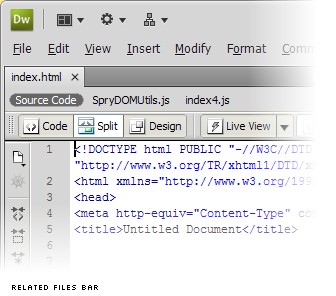
Open an HTML (or PHP, ColdFusion, JSP, ASP, ASP.NET) file in Dreamweaver CS4, and the new Related Files bar instantly displays every other code file in your site that is used to display that page in a browser (or assemble it on the server). Switch on the Live Preview, and instead of the dumb WYSIWYG view of your page, you’ll see the fully-rendered page with all server-side and JavaScript-powered features intact.
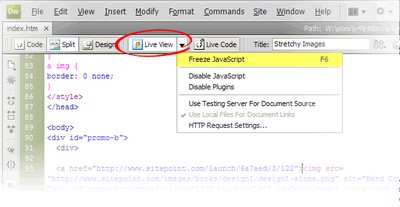
Powered by the open source WebKit engine at the heart of browsers like Safari and Google Chrome, the Live Preview is not merely a preview, but a code navigation tool: double-click any element on the page, and the code panel will jump to the HTML code responsible for generating it. If that code is contained in another file, that file is automatically selected in the Related Files bar so that you can edit it without leaving the main file (or its Live Preview) behind!

It gets better: Alt-click any element in the Live Preview, and up pops the Code Navigator with a breakdown of the CSS rules that contribute to the element’s appearance! Click any of these to jump straight to the relevant line of code, where you can make adjustments and watch the Live Preview update instantly.
Read on for my thoughts on why Dreamweaver CS4 may or may not be for you…
Up to and including Dreamweaver CS3, the program was clearly conceived to protect web designers from all the scary code that goes into building a site. It let you generate HTML markup using toolbar buttons and property inspectors instead of tags and attributes. It let you style that markup using wizards and panels instead of CSS rules and properties. The Code View was there if you needed it, but the program did its best to make sure you didn’t.
In recent years, this had become a losing battle as more and more designers needed to take control of their code. It didn’t just matter what the finished product looked like; designers had started to care about what the code looked like too. Dreamweaver’s helpful attempts to hide code behind simple tools became a hindrance more than a help.
Clearly, Adobe has been paying attention. Although the WYSIWYG Design View is still there, as are the panels and wizards, Dreamweaver CS4 adds support for a whole new way of working—one that is largely code-oriented.
Open an HTML (or PHP, ColdFusion, JSP, ASP, ASP.NET) file in Dreamweaver CS4, and the new Related Files bar instantly displays every other code file in your site that is used to display that page in a browser (or assemble it on the server). Switch on the Live Preview, and instead of the dumb WYSIWYG view of your page, you’ll see the fully-rendered page with all server-side and JavaScript-powered features intact.
Powered by the open source WebKit engine at the heart of browsers like Safari and Google Chrome, the Live Preview is not merely a preview, but a code navigation tool: double-click any element on the page, and the code panel will jump to the HTML code responsible for generating it. If that code is contained in another file, that file is automatically selected in the Related Files bar so that you can edit it without leaving the main file (or its Live Preview) behind!
It gets better: Alt-click any element in the Live Preview, and up pops the Code Navigator with a breakdown of the CSS rules that contribute to the element’s appearance! Click any of these to jump straight to the relevant line of code, where you can make adjustments and watch the Live Preview update instantly.
Read on for my thoughts on why Dreamweaver CS4 may or may not be for you…
Sunday, September 02, 2007
Google Mobile Phones

Google has been lobbying the U.S. government for changes in wireless policy. While it did not achieve as much as it wanted in the planning for the upcoming 700 Mhz spectrum auction in January, it did push for the fact that consumers in the U.S. can buy any phone and use it on any carrier in the future. Meaning, that when the Gphone does drop, most likely you’ll be albe to use it on any carrier you please. The Googlephone will most likely be 3G as well, which means video conferencing, yea you can’t do that with the iPhone. For you iPhones users though, would this be enough to make you switch?

The Observer of London is reporting that Google might be working with HTC and mobile/telecom giant Orange to build a Google Mobile Phone, which could possibly have Google software inside the device, and would be able to do many of the web tasks smartly. The device, article speculates, could go on sale in 2008. (Of course, we would all have forgotten by then… if it doesn’t happen.) Orange and Google, both declined to comment.

Their plans centre on a branded Google phone, which would probably also carry Orange’s logo. The device would not be revolutionary: manufactured by HTC, a Taiwanese firm specialising in smart phones and Personal Data Assistants (PDAs), it might have a screen similar to a video iPod. But it would have built-in Google software which would dramatically improve on the slow and cumbersome experience of surfing the web from a mobile handset.
Wednesday, August 15, 2007
Do You Make These Mistakes With Your Web Site?
While it's true that "nobody's perfect," I think the same goes for small business web sites as well - no web site is absolutely perfect. Even the best of the best often have room for improvement!
But there are some basic web site mistakes that many small companies make that can end up hurting business instead of helping it. Do any of these mistakes show up on your web site?
- Not enough content.
Often, small businesses will put minimal information along with their contact information on their web sites and think that's probably good enough. But today's web visitors are looking for something more, and lots of good quality content is a great way to deliver value to your visitors and build credibility for your business.
- Old or outdated content.
If you want visitors and search engines to pay attention to your web site, you need to keep adding new content and updating the existing information on your web site regularly. If your site never changes, the search engines will ignore your site, and visitors will not have a reason to come back. It's also unlikely that visitors will recommend your site to their friends and colleagues, too.
- Not being search engine friendly.
Speaking of search engines, what happens if a search engine spider visits your site, but can't read your web pages? Nothing happens, and that's a problem. If a search engine spider cannot read your web pages, it just moves on to the next site, and your information is completely ignored. Your web site must be search engine friendly in order to be included in the search engine databases.
- Not monitoring your site in the search engines.
Even if your web site is search engine friendly, there are constant changes going on with the search engines and also with your competitors. If you aren't monitoring how your site is performing in the search engines, how will you know if these changes are affecting your rankings or if you are losing traffic? Monitoring your web site means that you can react to changes and take appropriate steps to make sure your site shows up in the search results and that web traffic keeps flowing.
- The site is built using Frames or Flash.
Not too many web sites still make this mistake, but there are still some small business web sites out there using one or both of these methods. Sites built with Frames or Flash intro pages cannot easily be read by the search engines, and web visitors typically hate using them as well. These are older web techniques that don't reflect well on your business, they don't perform well in the search engines, and today's web visitors expect better.
Making your web site the best it can be is a very effective and affordable marketing option for most small businesses. Of all the other types of advertising and marketing that you do each year, your web site has the potential to be seen by more customers, can continue to promote your company perpetually through links, is always accessible to customers, and can instantly reflect changes and provide fresh information to draw people in.
Avoiding basic web site mistakes will help your site perform better, making it a "perfect" marketing strategy for your small business.
But there are some basic web site mistakes that many small companies make that can end up hurting business instead of helping it. Do any of these mistakes show up on your web site?
- Not enough content.
Often, small businesses will put minimal information along with their contact information on their web sites and think that's probably good enough. But today's web visitors are looking for something more, and lots of good quality content is a great way to deliver value to your visitors and build credibility for your business.
- Old or outdated content.
If you want visitors and search engines to pay attention to your web site, you need to keep adding new content and updating the existing information on your web site regularly. If your site never changes, the search engines will ignore your site, and visitors will not have a reason to come back. It's also unlikely that visitors will recommend your site to their friends and colleagues, too.
- Not being search engine friendly.
Speaking of search engines, what happens if a search engine spider visits your site, but can't read your web pages? Nothing happens, and that's a problem. If a search engine spider cannot read your web pages, it just moves on to the next site, and your information is completely ignored. Your web site must be search engine friendly in order to be included in the search engine databases.
- Not monitoring your site in the search engines.
Even if your web site is search engine friendly, there are constant changes going on with the search engines and also with your competitors. If you aren't monitoring how your site is performing in the search engines, how will you know if these changes are affecting your rankings or if you are losing traffic? Monitoring your web site means that you can react to changes and take appropriate steps to make sure your site shows up in the search results and that web traffic keeps flowing.
- The site is built using Frames or Flash.
Not too many web sites still make this mistake, but there are still some small business web sites out there using one or both of these methods. Sites built with Frames or Flash intro pages cannot easily be read by the search engines, and web visitors typically hate using them as well. These are older web techniques that don't reflect well on your business, they don't perform well in the search engines, and today's web visitors expect better.
Making your web site the best it can be is a very effective and affordable marketing option for most small businesses. Of all the other types of advertising and marketing that you do each year, your web site has the potential to be seen by more customers, can continue to promote your company perpetually through links, is always accessible to customers, and can instantly reflect changes and provide fresh information to draw people in.
Avoiding basic web site mistakes will help your site perform better, making it a "perfect" marketing strategy for your small business.
Saturday, January 13, 2007
iPhone is 0ut
Apple's announcements at 9th Jan 9AM San Fransisco Steve Jobs KeyNote
1. AppleTV - Oops Symbol(Apple) TV - See the difference :-)
2. iPhone - No - iPhone is copyrighted by Cisco - so Symbol(Apple) iPhone - See the difference

iPhone combines three products — a revolutionary mobile phone, a widescreen iPod with touch controls, and a breakthrough Internet communications device with desktop-class email, web browsing, maps, and searching — into one small and lightweight handheld device. iPhone also introduces an entirely new user interface based on a large multi-touch display and pioneering new software, letting you control everything with just your fingers. So it ushers in an era of software power and sophistication never before seen in a mobile device, completely redefining what you can do on a mobile phone.

Technical Specifications
Screen size : 3.5 inches
Screen resolution : 320 by 480 at 160 ppi
Input method : Multi-touch
Operating system :OS X
Storage : 4GB or 8GB
GSM : Quad-band (MHz: 850, 900, 1800, 1900)
Wireless data : Wi-Fi (802.11b/g) + EDGE + Bluetooth 2.0
Camera : 2.0 megapixels
Battery : Up to 5 hours Talk / Video / Browsing
Up to 16 hours Audio playback
Dimensions : 4.5 x 2.4 x 0.46 inches / 115 x 61 x 11.6mm
Weight : 4.8 ounces / 135 grams

iPhone is a widescreen iPod with touch controls that lets you enjoy all your content — including music, audiobooks, videos, TV shows, and movies — on a beautiful 3.5-inch widescreen display. It also lets you sync your content from the iTunes library on your PC or Mac. And then you can access it all with just the touch of a finger.
Music
Scroll through your songs, artists, albums, and playlists with just a flick of a finger. Album artwork is dramatically presented on the large display. And now use Cover Flow to browse your music library by album artwork for the first time on an iPod.

Video
iPhone's stunning 3.5-inch widescreen display is the ultimate way to watch TV shows and movies from the iTunes Store on a pocketable device. Just tap the touch controls for play/pause, chapter forward/backward, and volume.

Music
Scroll through your songs, artists, albums, and playlists with just a flick of a finger. Album artwork is dramatically presented on the large display. And now use Cover Flow to browse your music library by album artwork for the first time on an iPod.

Revolutionary Phone:
iPhone is a revolutionary new mobile phone that allows you to make a call by simply pointing your finger at a name or number in your address book, a favorites list, or a call log. It also automatically syncs all your contacts from a PC, Mac, or Internet service. And it lets you select and listen to voicemail messages in whatever order you want — just like email.
Receiving and making a call
With iPhone, making a call is as simple as touching a name or number. In addition, you can easily construct a favorites list for your most frequently made calls, and quickly merge calls together to create conference calls.

Visual Voicemail
An industry first, Visual Voicemail allows you to go directly to any of your messages without listening to the prior messages. So you can quickly select the messages that are most important to you.

SMS
iPhone includes an SMS application with a predictive QWERTY soft keyboard that prevents and corrects mistakes, making it easier and more efficient to use than the small plastic keyboards on many smartphones.

Photos
iPhone features a 2-megapixel camera and a photo management application that goes far beyond anything on a phone today. Sync photos from your PC or Mac, and you're ready to browse or email them with the flick of a finger.

Receiving and making a call
With iPhone, making a call is as simple as touching a name or number. In addition, you can easily construct a favorites list for your most frequently made calls, and quickly merge calls together to create conference calls.

Breakthrough Internet Device
iPhone features a rich HTML email client and Safari — the most advanced web browser ever on a portable device — which automatically syncs bookmarks from your PC or Mac. Safari also includes built-in Google and Yahoo! search. iPhone is fully multi-tasking, so you can read a web page while downloading your email in the background over Wi-Fi or EDGE.
Safari Web Browser
With its advanced Safari browser, iPhone lets you see any web page the way it was designed to be seen, then easily zoom in by simply tapping on the multi-touch display with your finger.

Mail
iPhone uses a rich HTML email client that fetches your email in the background from most POP3 or IMAP mail services and displays photos and graphics right along with the text.

Google Maps
With Google Maps and iPhone's amazing Maps application, you can view maps and satellite images, or get directions and traffic information, all from iPhone's remarkable, easy-to-use touch interface.

Widgets
iPhone even has widgets: small applications that give you helpful information like stock reports, weather reports, and more in real time.

Safari Web Browser
With its advanced Safari browser, iPhone lets you see any web page the way it was designed to be seen, then easily zoom in by simply tapping on the multi-touch display with your finger.

Multi-touch
iPhone features the most revolutionary user interface since the mouse. It's an entirely new interface based on a large multi-touch display and innovative new software that lets you control everything using only your fingers. So you can glide through albums with Cover Flow, flip through photos and email them with a touch, or zoom in and out on a section of a web page — all by simply using iPhone's multi-touch display.
Intelligent Keyboard
iPhone's full QWERTY soft keyboard lets you easily send and receive SMS messages in multiple sessions. And the keyboard is predictive, so it prevents and corrects mistakes, making it easier and more efficient to use than the small plastic keyboards on many smartphones.

Wireless
iPhone uses quad-band GSM, the global standard for wireless communications. It also supports Cingular's EDGE network, 802.11b/g Wi-Fi, and Bluetooth 2.0 with EDR, which links to Apple's new, remarkably compact Bluetooth headset.

Built-in Advanced Sensors
iPhone's accelerometer detects when you rotate the device from portrait to landscape, then automatically changes the contents of the display, so you immediately see the entire width of a web page or a photo in its proper landscape aspect ratio.
The proximity sensor detects when you lift iPhone to your ear and immediately turns off the display to save power and prevent inadvertent touches until iPhone is moved away.
An ambient light sensor automatically adjusts the display's brightness to the appropriate level for the current ambient light, thereby enhancing the user experience and saving power at the same time.
1.
AppleTV - Oops Symbol(Apple) TV - See the difference :-)2. iPhone - No - iPhone is copyrighted by Cisco - so
Symbol(Apple) iPhone - See the differenceiPhone combines three products — a revolutionary mobile phone, a widescreen iPod with touch controls, and a breakthrough Internet communications device with desktop-class email, web browsing, maps, and searching — into one small and lightweight handheld device. iPhone also introduces an entirely new user interface based on a large multi-touch display and pioneering new software, letting you control everything with just your fingers. So it ushers in an era of software power and sophistication never before seen in a mobile device, completely redefining what you can do on a mobile phone.
Technical Specifications
Screen size : 3.5 inches
Screen resolution : 320 by 480 at 160 ppi
Input method : Multi-touch
Operating system :OS X
Storage : 4GB or 8GB
GSM : Quad-band (MHz: 850, 900, 1800, 1900)
Wireless data : Wi-Fi (802.11b/g) + EDGE + Bluetooth 2.0
Camera : 2.0 megapixels
Battery : Up to 5 hours Talk / Video / Browsing
Up to 16 hours Audio playback
Dimensions : 4.5 x 2.4 x 0.46 inches / 115 x 61 x 11.6mm
Weight : 4.8 ounces / 135 grams
iPhone is a widescreen iPod with touch controls that lets you enjoy all your content — including music, audiobooks, videos, TV shows, and movies — on a beautiful 3.5-inch widescreen display. It also lets you sync your content from the iTunes library on your PC or Mac. And then you can access it all with just the touch of a finger.
Music
Scroll through your songs, artists, albums, and playlists with just a flick of a finger. Album artwork is dramatically presented on the large display. And now use Cover Flow to browse your music library by album artwork for the first time on an iPod.
Video
iPhone's stunning 3.5-inch widescreen display is the ultimate way to watch TV shows and movies from the iTunes Store on a pocketable device. Just tap the touch controls for play/pause, chapter forward/backward, and volume.
Music
Scroll through your songs, artists, albums, and playlists with just a flick of a finger. Album artwork is dramatically presented on the large display. And now use Cover Flow to browse your music library by album artwork for the first time on an iPod.
Revolutionary Phone:
iPhone is a revolutionary new mobile phone that allows you to make a call by simply pointing your finger at a name or number in your address book, a favorites list, or a call log. It also automatically syncs all your contacts from a PC, Mac, or Internet service. And it lets you select and listen to voicemail messages in whatever order you want — just like email.
Receiving and making a call
With iPhone, making a call is as simple as touching a name or number. In addition, you can easily construct a favorites list for your most frequently made calls, and quickly merge calls together to create conference calls.
Visual Voicemail
An industry first, Visual Voicemail allows you to go directly to any of your messages without listening to the prior messages. So you can quickly select the messages that are most important to you.
SMS
iPhone includes an SMS application with a predictive QWERTY soft keyboard that prevents and corrects mistakes, making it easier and more efficient to use than the small plastic keyboards on many smartphones.
Photos
iPhone features a 2-megapixel camera and a photo management application that goes far beyond anything on a phone today. Sync photos from your PC or Mac, and you're ready to browse or email them with the flick of a finger.
Receiving and making a call
With iPhone, making a call is as simple as touching a name or number. In addition, you can easily construct a favorites list for your most frequently made calls, and quickly merge calls together to create conference calls.
Breakthrough Internet Device
iPhone features a rich HTML email client and Safari — the most advanced web browser ever on a portable device — which automatically syncs bookmarks from your PC or Mac. Safari also includes built-in Google and Yahoo! search. iPhone is fully multi-tasking, so you can read a web page while downloading your email in the background over Wi-Fi or EDGE.
Safari Web Browser
With its advanced Safari browser, iPhone lets you see any web page the way it was designed to be seen, then easily zoom in by simply tapping on the multi-touch display with your finger.
iPhone uses a rich HTML email client that fetches your email in the background from most POP3 or IMAP mail services and displays photos and graphics right along with the text.
Google Maps
With Google Maps and iPhone's amazing Maps application, you can view maps and satellite images, or get directions and traffic information, all from iPhone's remarkable, easy-to-use touch interface.
Widgets
iPhone even has widgets: small applications that give you helpful information like stock reports, weather reports, and more in real time.
Safari Web Browser
With its advanced Safari browser, iPhone lets you see any web page the way it was designed to be seen, then easily zoom in by simply tapping on the multi-touch display with your finger.
Multi-touch
iPhone features the most revolutionary user interface since the mouse. It's an entirely new interface based on a large multi-touch display and innovative new software that lets you control everything using only your fingers. So you can glide through albums with Cover Flow, flip through photos and email them with a touch, or zoom in and out on a section of a web page — all by simply using iPhone's multi-touch display.
Intelligent Keyboard
iPhone's full QWERTY soft keyboard lets you easily send and receive SMS messages in multiple sessions. And the keyboard is predictive, so it prevents and corrects mistakes, making it easier and more efficient to use than the small plastic keyboards on many smartphones.
Wireless
iPhone uses quad-band GSM, the global standard for wireless communications. It also supports Cingular's EDGE network, 802.11b/g Wi-Fi, and Bluetooth 2.0 with EDR, which links to Apple's new, remarkably compact Bluetooth headset.
Built-in Advanced Sensors
iPhone's accelerometer detects when you rotate the device from portrait to landscape, then automatically changes the contents of the display, so you immediately see the entire width of a web page or a photo in its proper landscape aspect ratio.
The proximity sensor detects when you lift iPhone to your ear and immediately turns off the display to save power and prevent inadvertent touches until iPhone is moved away.
An ambient light sensor automatically adjusts the display's brightness to the appropriate level for the current ambient light, thereby enhancing the user experience and saving power at the same time.
Subscribe to:
Posts (Atom)