Up to and including Dreamweaver CS3, the program was clearly conceived to protect web designers from all the scary code that goes into building a site. It let you generate HTML markup using toolbar buttons and property inspectors instead of tags and attributes. It let you style that markup using wizards and panels instead of CSS rules and properties. The Code View was there if you needed it, but the program did its best to make sure you didn’t.
In recent years, this had become a losing battle as more and more designers needed to take control of their code. It didn’t just matter what the finished product looked like; designers had started to care about what the code looked like too. Dreamweaver’s helpful attempts to hide code behind simple tools became a hindrance more than a help.
Clearly, Adobe has been paying attention. Although the WYSIWYG Design View is still there, as are the panels and wizards, Dreamweaver CS4 adds support for a whole new way of working—one that is largely code-oriented.
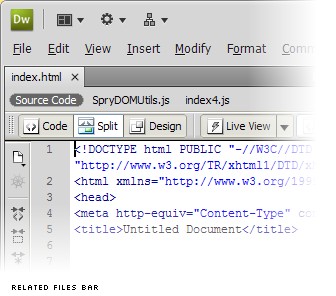
Open an HTML (or PHP, ColdFusion, JSP, ASP, ASP.NET) file in Dreamweaver CS4, and the new Related Files bar instantly displays every other code file in your site that is used to display that page in a browser (or assemble it on the server). Switch on the Live Preview, and instead of the dumb WYSIWYG view of your page, you’ll see the fully-rendered page with all server-side and JavaScript-powered features intact.
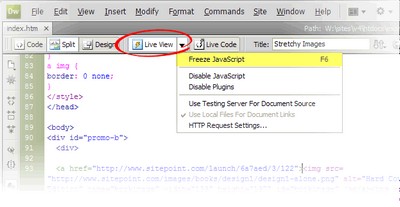
Powered by the open source WebKit engine at the heart of browsers like Safari and Google Chrome, the Live Preview is not merely a preview, but a code navigation tool: double-click any element on the page, and the code panel will jump to the HTML code responsible for generating it. If that code is contained in another file, that file is automatically selected in the Related Files bar so that you can edit it without leaving the main file (or its Live Preview) behind!

It gets better: Alt-click any element in the Live Preview, and up pops the Code Navigator with a breakdown of the CSS rules that contribute to the element’s appearance! Click any of these to jump straight to the relevant line of code, where you can make adjustments and watch the Live Preview update instantly.
Read on for my thoughts on why Dreamweaver CS4 may or may not be for you…

1 comment:
thanks ur information
it very useful
Post a Comment